
Junk Removal Pricing & Quoting
Stop guessing
what to charge.
Price jobs confidently.
Protect your margins.
Keep business moving.
Boparo helps junk-removal businesses understand their costs, choose informed prices, and create professional customer estimates.
One-time Core purchase. No recurring Core subscription.
Actual Boparo interface. Fictional demonstration data.
Cost-aware pricing
Know what a job costs
before you quote it.
Labor. Vehicles. Disposal. Overhead.
Bring your real costs into every pricing decision.
Guidance based on your configured costs and margins. Outcomes are not guaranteed.
Three clear options
Target
The price that aims for your target profitability.
Acceptable
A considered alternative within your guardrails.
Hard Floor
See your minimum pricing boundary before deciding.
See business cost settings
Fictional company setup.
- 01
Set your costs
Start with the way your business runs.
- 02
Build the job
Load size, crew, time, travel, disposal.
- 03
Choose your price
See your options and what they mean.
- 04
Share the estimate
Give your customer a clear next step.
Professional estimates
From a confident price
to a clear estimate.
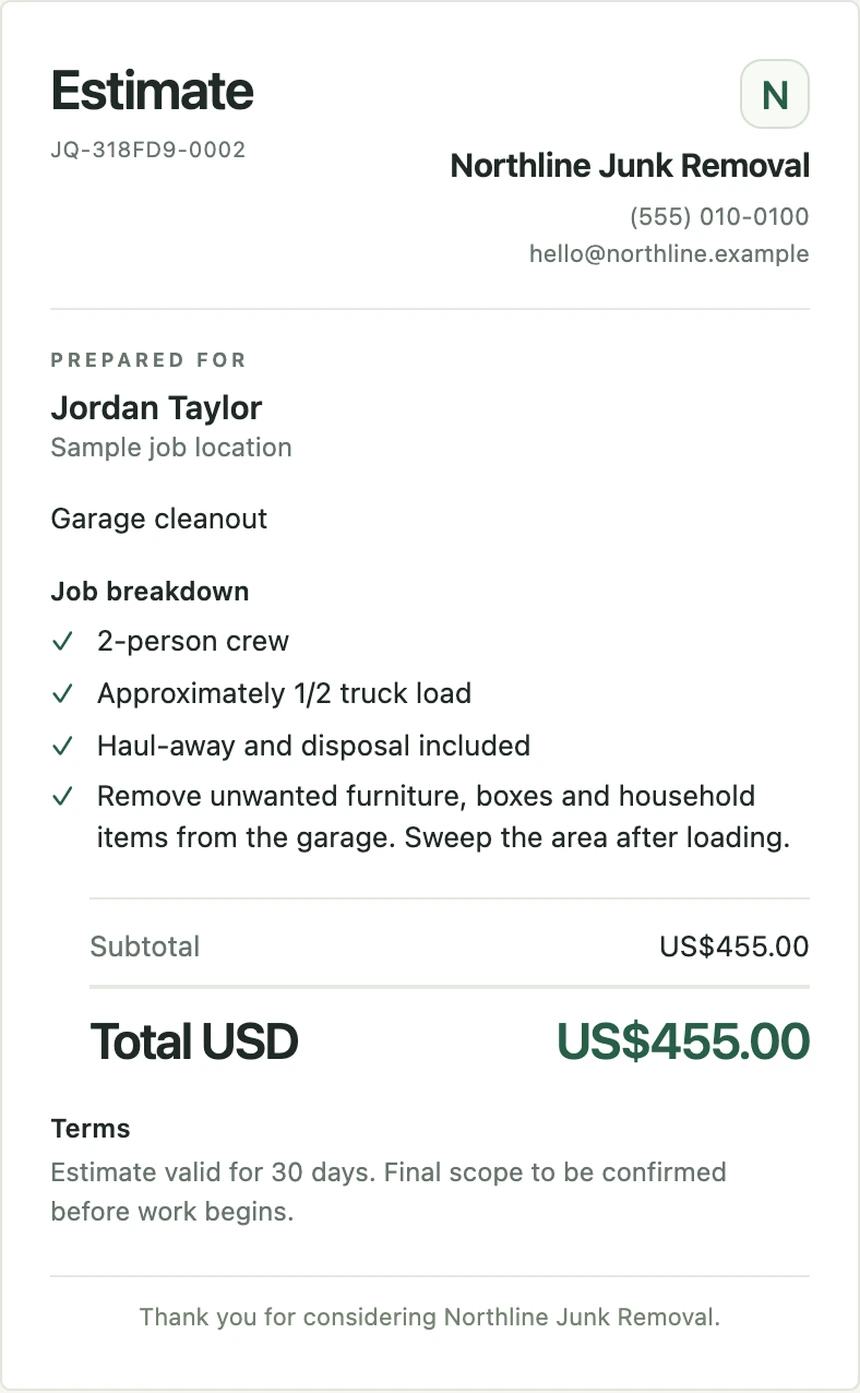
Give your customer the details they need.
Keep your internal costs to yourself.
- Customer-ready PDF, sharing and print
- Clear scope, price and terms
- Customer acceptance and finalized history
One considered quote. A professional handoff.
Fictional customer and business. Actual estimate renderer.
Pricing intelligence
Learn from every quote.
See which estimates are accepted or declined.
Explore your history. Recognize patterns worth understanding.
Import historical quotes. Track outcomes. Explore job categories and comparable quoted prices.
Illustrative dataset, real calculations. Acceptance is not proof of payment or profit. Patterns do not establish an optimal price.
The everyday essentials
Built for the way
you work.
Work where the work is.
Use Boparo on your phone, tablet or computer. Keep quoting offline on an already-provisioned device, then sync when you reconnect.
One business. One team.
Share company configuration and quote history with 15 flexible seats, including one primary Owner. The Owner and Admins manage business settings.
Keep the history.
Return to quotes, finalized versions, customer acceptance and private internal notes. Record accepted or declined outcomes without rewriting an estimate.
A clear customer handoff.
Create customer-ready PDFs, print estimates and collect acceptance. Your internal costs stay inside Boparo.
Simple, one-time Core pricing
Your business.
Your team.
One Boparo Company.
Boparo Core — Junk Removal
- 15 flexible Company seats: one Owner, Admins and Estimators
- Cost-aware job pricing with Target, Acceptable and Hard Floor guidance
- Company cost, margin and service configuration
- Branded customer estimates with custom quote numbering, PDF, sharing and print
- Finalized estimate versions and customer acceptance with signature evidence
- Company quote history and private internal job notes
- Offline quoting on provisioned devices, with cross-device synchronization
- Historical CSV import, quote outcome tracking and descriptive Pricing Intelligence
- No recurring Boparo Core subscription
Introductory Core price
USD $79one-time
Standard Core price: USD $99 one-time.
Get Boparo14-calendar-day money-back guarantee.
Read the Refund Policy →
A few good questions.
Is Boparo a subscription?
Boparo Core is a one-time purchase, with no recurring Core subscription. The Terms of Service describe the license and service boundaries. Read the Terms.
Can I use it on my phone?
Yes. Boparo works in a modern mobile browser and can be installed as a web app. You can also use it on a tablet or computer.
Does it work offline?
After signing in online and loading your company, an authorized device can work with its local data offline for up to 30 days from access verification. Changes sync when you reconnect. Quote numbering also requires available reserved numbers; reconnect briefly if they run out. A new device needs an online connection first.
Can my team use it?
One Company includes 15 total seats: exactly one primary Owner and up to 14 Admins or Estimators in any combination. Invite your team into the same company; they use its pricing configuration while the Owner and Admins manage business settings.
Can I buy additional seats?
Core includes 15 total Company seats with no separate charge for the included Admins or Estimators. Additional seats are not currently offered; there is no extra-seat price or monthly seat subscription.
Can I import my previous quotes?
The Owner can import historical quotes from a CSV, map the columns and review the records before confirming. These become historical observations for intelligence, not recreated Boparo estimate documents.
Can customers accept estimates?
Yes. Boparo supports customer acceptance of a finalized estimate, including signature evidence when enabled. Acceptance does not mean the job is completed or payment has been collected.
Does it replace my invoicing or CRM software?
No. Boparo focuses on pricing, quoting and learning from quote outcomes. Continue using your existing tools for invoicing, payments, scheduling and CRM.
What support is available?
Use Help & Feedback in Boparo, or email support@boparo.com. You can ask for help, report a problem or suggest a feature. Email support.
What is the refund policy?
The voluntary money-back guarantee covers 14 calendar days after an eligible purchase, subject to the Refund Policy. Statutory rights remain unaffected. Read the full Refund Policy.
Intelligent Pricing & Quoting
Price smart.
Keep moving.
Move from uncertain costs to informed prices
and professional estimates.
15 Company seats. One-time Core purchase.